> For the complete documentation index, see [llms.txt](https://usermanual.ergonode.com/llms.txt). Markdown versions of documentation pages are available by appending `.md` to page URLs; this page is available as [Markdown](https://usermanual.ergonode.com/ergonode-user-manual-pl/struktura-produktu/szablony-produktu/glowne-szablony/klonowanie-szablonu.md).
# Klonowanie szablonu
Funkcja „Klonuj szablon” pozwala utworzyć kopię istniejącego szablonu produktu z nową nazwą.
Możesz użyć tej funkcji, aby zaoszczędzić czas i uniknąć powtarzania tych samych kroków podczas tworzenia podobnych głównych szablonów.
Aby użyć funkcji „*Clone template*”, wykonaj następujące kroki:
* Przejdź do zakładki „*Product templates*” i kliknij „*ikonę edycji (pióro)*” obok głównego szablonu, który chcesz sklonować. Spowoduje to otwarcie szablonu w trybie edycji.
* Kliknij „*three dots"* menu w prawym górnym rogu ekranu. Pokaże ono dwie opcje: „*Clone template*” oraz „*Delete template*”.
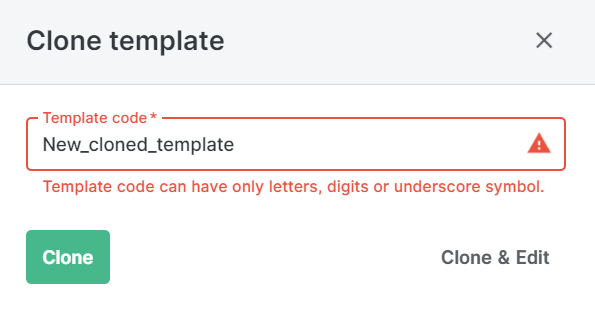
* Kliknij opcję „*Clone template*” . Otworzy się nowe okno, w którym należy wpisać kod dla nowego głównego szablonu. Kod musi być unikalny i różny od oryginalnego szablonu oraz składać się wyłącznie z liter, cyfr lub podkreśleń.
* Kliknij opcję „*Clone*” przycisk, aby utworzyć nowy główny szablon. Spowoduje to sklonowanie wszystkich ustawień i sekcji oryginalnego szablonu. Nowy szablon zobaczysz na liście w zakładce „*Main template*” z kodem, który wprowadziłeś.
* Alternatywnie możesz kliknąć przycisk „*Clone & Edit*”, aby utworzyć nowy główny szablon i otworzyć go w trybie edycji. Pozwoli to na wprowadzenie zmian w nowym szablonie, takich jak dodawanie lub usuwanie sekcji, zmiana kolejności sekcji lub przypisanie Zestawu kompletności.
Możesz użyć funkcji „*Clone template*” , aby utworzyć wiele głównych szablonów o podobnym układzie i funkcjach. Pomoże to usprawnić zarządzanie produktami i proces wzbogacania danych w Ergonode PIM.
---
# Agent Instructions
This documentation is published with GitBook. GitBook is the documentation platform designed so that both humans and AI agents can read, navigate, and reason over technical content effectively. Learn more at gitbook.com.
## Querying This Documentation
If you need additional information that is not directly available in this page, you can query the documentation by asking a question.
Perform an HTTP GET request on the following URL with the `ask` and `goal` query parameters:
```
GET https://usermanual.ergonode.com/ergonode-user-manual-pl/struktura-produktu/szablony-produktu/glowne-szablony/klonowanie-szablonu.md?ask=&goal=
```
`ask` is the immediate question: it should be specific, self-contained, and written in natural language.
`goal` is what the user is ultimately trying to achieve, the reason they need the answer. Sharing it helps GitBook give you a better, more relevant answer. A goal is most helpful when it describes the outcome the user wants rather than restating the question. For example, with `ask=how do I create an API token`, a goal like `automate deployments from our CI pipeline` lets GitBook tailor the answer to that use case.
The response will contain a direct answer to the question and relevant excerpts and sources from the documentation.
Use this mechanism when the answer is not explicitly present in the current page, you need clarification or additional context, or you want to retrieve related documentation sections.